
HA777 Interface Preview
HA777 Screenshots,App Interface & Mobile Experience
Preview the HA777 lobby, account screens, game collections and activity pages before you open the platform. Start with the gallery below, then use the relevant guide for registration, payments or installation.
Screenshots show the interface at the time of capture. Use the current platform screen for live offers, balances, game availability and order status.
4
Gallery Groups
Account & Games
Interface Preview
Rewards & Referrals
Activity Preview
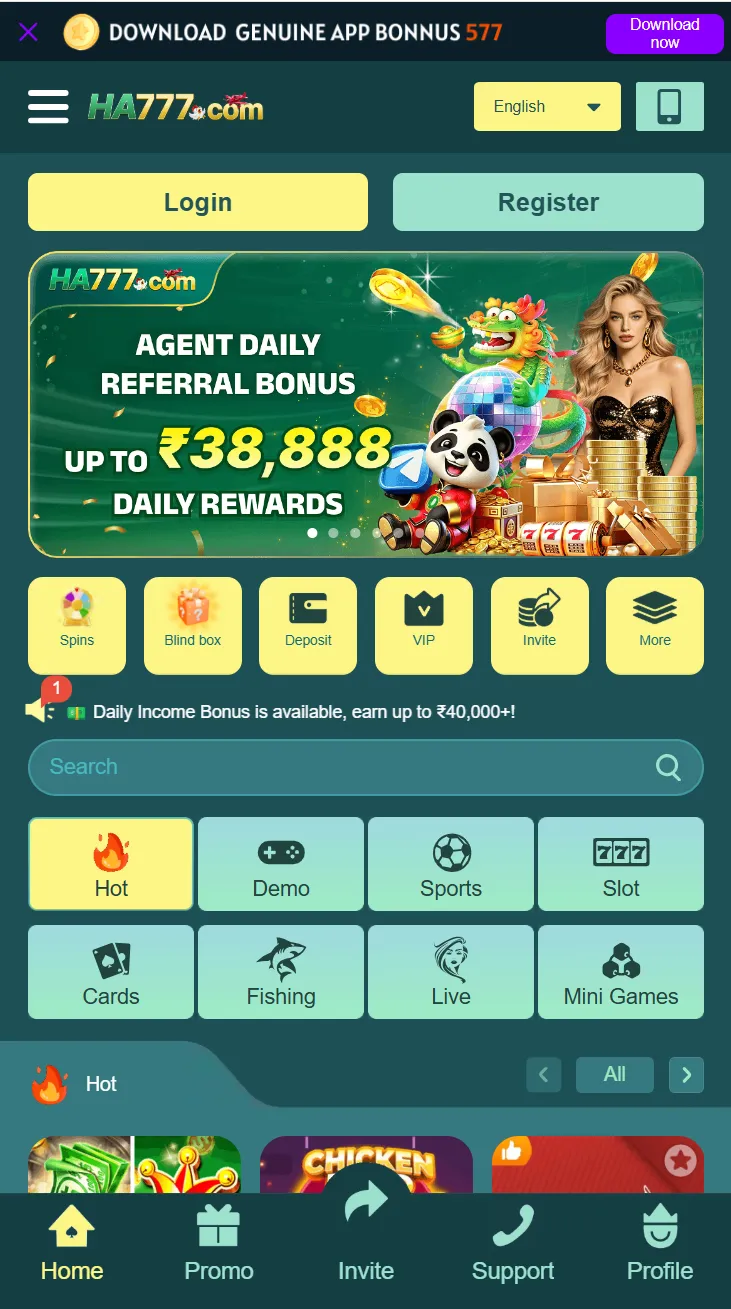
Screenshot Gallery
HA777 App,Game & Mobile Screenshots
Browse four groups: account and navigation, activities, game collections, and referral information.
HA777 App Interface & Account Screens
Find the lobby, Login, Register, profile and support screens. Use the login or registration guide for the next step; the gallery itself does not collect account details.
HA777 Home Layout
HA777 Login
HA777 Registration
HA777 Profile
HA777 About
HA777 Customer Support
HA777 Languages
HA777 Bonus, Rewards & Promotions
See where activities, VIP information and Lucky Wheel appear. A banner is an activity preview; open the live event for eligibility, tasks and claim requirements.
Rewards
Invite Rewards
VIP Promotion
Agent Rewards
HA777 Activities
Promotion Sharing
Lucky Wheel
HA777 Games & Entertainment
Compare the appearance of card games, slots and other catalogue sections. These images preview menus and game selections, rather than demonstrate gameplay results.
Card Game
Card Game 2
T1 Game
JILI Game
PG Game
Slots
Mini Game
Spins
Demo Game
Live Casino
Live Casino 2
Aviator
Sports
Sports 2
Hot Game
Blind Box
In Out Game
WG Game
Fishing
HA777 Referral & Commission Programs
Preview referral and commission information by category. Read the active programme rules before inviting friends; the screenshots do not establish expected earnings.
Card Commission
Fishing Commission
Live Commission
Slots Commission
Sports Commission
Mini Games Commission
Find The Screen You Need
For a new account, begin with Login and Registration in the first gallery group. To explore games, use the game collection previews. For rewards, compare the activity list with the event currently displayed inside HA777.
For a payment problem, use the payment guide and your own order record. Gallery images do not show the status of your transaction.
Interface & Features
Read The Preview,Then Choose Your Next Step
Use the screenshots to recognise a section, then open the guide that explains what to do there.
Account Access
Recognise the Login and Register screens. The account guides explain sign-in, account creation and recovery.
Game Collections
Compare catalogue layouts and provider sections, then use the games page to explore formats and named titles.
Activity Pages
Find rewards, VIP and referral entries. Open the activity itself to read the task and claim conditions.
What A Screenshot Can Tell You
A screenshot is useful for identifying buttons, menus and page layout. It cannot confirm a current balance, an available prize, a payout time or an installed App version.
Rewards & Promotions
HA777 Bonus,Rewards & Promotional Screens
Preview activity-list and reward screens. For current tasks, claim steps and reward conditions, continue to the bonus guide or open Promo inside the platform.
HA777 Activities
Referral Rewards: View referral activities, campaigns, and reward programs.
Promotional Events: Browse seasonal campaigns, reward activities, and promotional events.
Explore HA777 Rewards & Promotional Experiences
Use the activity list to recognise the promotion you want, then open its details. Check eligibility, the required task, the reward type and the claim step before taking part.
Older screenshots may contain event artwork or amounts that have changed. A displayed banner does not confirm that an event is currently available to your account.
Device Compatibility
From Interface PreviewTo Device Setup
The gallery helps you recognise the interface. Use the download page to choose an access option and the installation guide to troubleshoot setup.
Choose Your Access Route
An interface screenshot does not identify the installation method required on your device.
- Website access through a mobile browser
- Android download entry inside HA777
- iOS access instructions inside HA777
Follow the instructions shown for your device.
Requirements
System Specifications
| Item | Information |
|---|---|
| Android package | 7.07 MB |
| iOS package | 5.8 MB |
| System compatibility | Review the device requirements shown by the current HA777 installer. |
| Storage | Leave additional space for installation, updates and game resources. |
| Connection | Stable mobile data or Wi-Fi. |
| Installation route | Use the Android or iOS instructions inside HA777. |
Mobile Compatibility & User Experience
Check available storage and the current installer requirements before installing. For a failed download, update problem or App that will not open, use the installation guide rather than relying on an old screenshot.
Frequently Asked Questions
HA777 ScreenshotsFrequently Asked Questions
Find answers about HA777 screenshots, app interfaces, mobile experiences, rewards previews, and application features.
Can I preview HA777 before installing?
Yes. Browse the account, game and activity screenshots on this page. You can also open the platform website before deciding whether to use an App.
Are all screenshots from the current App version?
The gallery includes images captured at different times. Menus, artwork and available activities can change; use the live platform for current information.
Do these screenshots confirm an available bonus?
No. They show the activity interface. Open the event inside HA777 to check whether it is available to your account and read its requirements.
Where do I find deposit and withdrawal instructions?
Open the payment guide for limits, payment options, order-status help and the information to prepare for support.
Can I log in through a screenshot?
No. Use Login to open the platform and enter your account details there. The gallery is for viewing images only.
Explore More HA777 Features
Ready To ExploreThe HA777 Mobile Experience?
Choose a guide for your next task, or use Login to open HA777 and continue on the platform.