
24/7 Help Center
ContactHA777 Support
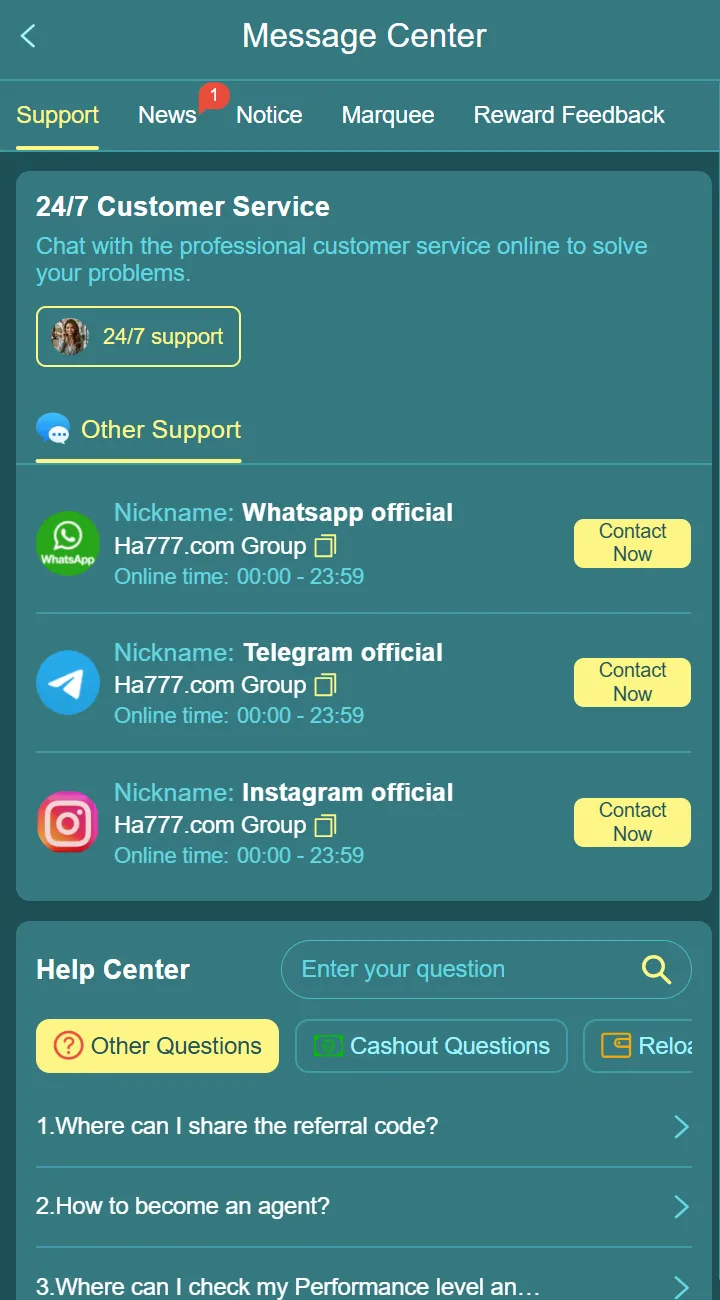
Get help with your account, app, rewards or a payment order. Click the site Login button to enter HA777, follow the platform login prompts and open its customer support entry. Support is available 24/7. Keep the relevant order number or error details ready.
Get The Right Help For Every HA777 Question
Use the HA777 platform support entry for account, App, activity and payment questions. For a task you can complete yourself, the guides below explain the steps before you contact support.
Platform Support
Use Login to open HA777, follow any sign-in prompts and open Support.
Account Help
Describe the error shown and the step where access or registration stopped.
Payment Help
Prepare the order number, amount, submission time and current status.
Activity Help
Provide the activity name and the relevant task or claim record.
Contact Information
Open SupportInside HA777
The confirmed support route is inside the HA777 platform. Use the button below to open the platform and find its support entry.
Support Through HA777
Click Login to enter HA777, sign in as prompted and open the platform customer support entry. Describe your account, app, activity or payment problem.
- Keep your account or payment reference.
- Never share passwords, OTPs or PINs.
24/7 Customer Support
Use the customer support entry inside HA777 for account, App, activity and payment questions. Click the site Login button to enter the platform first.
Keep One Clear Record
Keep the relevant order reference and the reply in the same support conversation when possible. Add any new error or status change to that enquiry.
Share only the details needed to identify the issue through platform support. Never send passwords, verification codes, payment PINs or full card credentials.
Why Contact HA777
Choose The RightGuide Or Support Topic
Use a guide for general instructions. Use platform support when the answer depends on your account, order or activity record.
Download & Installation
Tap Download on the platform homepage for its guided popup. For a failed installation or update, use the installation guide.
Registration & Login
Follow the account guides first. For an unresolved error, record the exact message and contact platform support.
Activities & Rewards
Read the activity task and claim steps. Ask support about a missing reward using the activity name and related record.
Deposit & Withdrawal
Check the order status before following up. Prepare its reference, amount and time so support can identify the issue.
Describe The Problem In One Message
Include what you were trying to do, the step where it stopped and the message or status shown. Add your device and browser or App details for a technical issue.
For an order, include its reference, amount and time. Crop unrelated personal details from screenshots. Never include passwords, verification codes or payment PINs.
Support Information
Support Availability &Response Process
Enter HA777 through Login, open the platform support entry and prepare the details relevant to your question.
| Support Topic | Availability | What to Prepare |
|---|---|---|
| Account & login | 24/7 | Account identifier and the displayed error. Never share passwords or OTPs. |
| App installation | 24/7 | Device type and the installation prompt or screenshot. |
| Offers & rewards | 24/7 | Activity name and the relevant claim or deposit record. |
| Deposit & withdrawal | 24/7 | Order number, payment reference and current status. |
How Our Support Process Works
Support is available 24/7. Availability does not mean every enquiry or payment order is resolved immediately.
Enter HA777 and Open Support
Click the site Login button, follow the platform login prompts and select its customer support entry. Describe your question clearly.
Support Review
Provide the relevant error message, activity name or order reference so platform support can identify the issue.
Receive A Response
Follow the instructions provided in the platform support conversation. Keep the reply with the related order or error record.
Follow-Up Assistance
If the issue continues, reply with any new message or status change and refer to the existing enquiry.
If An Order Is Still Unresolved
Check the order history and follow up with its current status. For a processed withdrawal that has not arrived, include the processing time and receiving-account details requested through platform support, without sharing payment credentials.
If a deposit appears paid but has not been credited, keep the transaction reference and ask support to check it before attempting to pay the same order again.
Frequently Asked Questions
Contact &Support Questions
Short answers about reaching platform support and preparing the information needed for a useful enquiry.
How can I contact HA777 support?
Click Login on this website to enter the HA777 platform, follow its login prompts and open the customer support entry. For payment questions, prepare the order number and a screenshot of the issue. Never share passwords or verification codes.
Can I get help with HA777 APK installation?
Yes. If you need assistance understanding the Android installation process, device compatibility, or setup instructions, you can explore the Install APK Guide or contact the support team for additional guidance.
Where can I find the latest HA777 download guide?
Use the Download page to choose an access route. On the HA777 homepage, tap Download to open the guided popup. Use the installation page for setup, updates and troubleshooting.
Does HA777 provide help for registration and login?
Yes. Our Help Center contains information related to registration guidance, account access, login instructions, and commonly asked questions for both new and returning users.
Can I ask questions about bonuses and rewards?
Absolutely. Visitors can contact the support team for general information regarding promotional campaigns, welcome rewards, referral activities, recharge offers, and other platform promotions.
Where can I view HA777 screenshots before downloading?
The Screenshot Gallery includes previews of the mobile interface, registration screens, rewards pages, promotional sections, and other parts of the Android application so visitors can understand the platform before downloading.
How long does it usually take to receive a response?
Platform support is available 24/7, but this guide does not promise a fixed response or resolution time. Keep your enquiry reference and follow up with any new status or error message.
What information should I include when contacting support?
Include the issue, the step where it occurred and the displayed error. For payments, add the order reference, amount, time and status. Never share passwords, verification codes, payment PINs or full card credentials.
Can I solve most issues without contacting support?
Use the guides for general account, download and activity instructions. An unresolved account restriction, payment order or reward record needs platform support to check the specific case.
When should I use a guide instead of contacting support?
Use a guide when you need general steps, such as how to register or find the download entry. Use platform support when the question depends on your own account, transaction or activity record.
Choose A Guide Or Follow Up On Your Case
Guides explain common tasks. They do not access your account or change an order. If you have already followed the instructions and the issue remains, continue through platform support with the relevant details.
Need More Help?
Continue WithThe Help You Need
For account-specific help, open HA777 and its support entry. For general instructions, select a guide below.
Explore More HA777 Resources
Choose the guide for your task. You do not need to read every page before contacting platform support.
Download Guide
Find the download popup and choose an access route for your device.
Install APK
Follow setup and update instructions, or troubleshoot an installation error.
Bonus Center
Read activity participation and claim guidance.
Screenshot Gallery
Preview account, game and activity screens.
FAQ Center
Find short answers and links to detailed guides.
About HA777
Read the brand overview and find the main platform resources.